
API Access
The Digital Onboarding API relies on OAuth2
for authentication. It is highly recommended that you read the spec and
familiarize yourself with it. The API should always be used via HTTPS. Any
attempts to use it via HTTP means that you may have compromised your
client_secret or access_token.
With the exception of the token creation end point, all API endpoints require an access_token in order to be used. The access_token is passed via the
Authorizationheader. For example, if your token wasabcdef, you would need to include the headerAuthorization: Bearer abcdef.
Tokens expire on a regular basis so you will need to account for that in the
way you use the API. If your token has expired you will receive an
HTTP/1.1 401 Unauthorized with a body of {"error": "invalid_token"}.
You should store tokens for reuse until they expire. Rather than retrieving
tokens at set intervals, you should build token retrieval into how
you access the API. This will prevent future changes to token expiration from
requiring you to make any updates to your code.
An example of a proper API usage work flow:
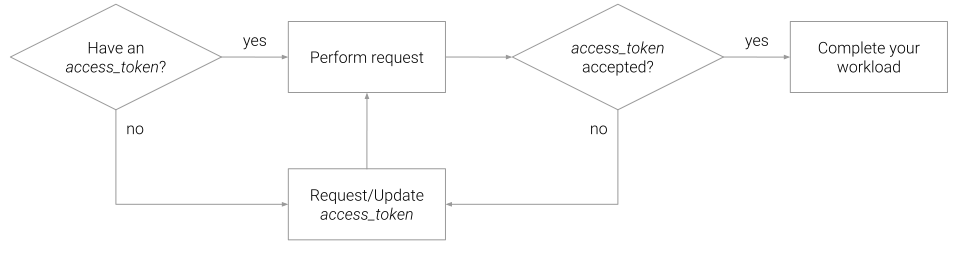
Most OAuth2 libraries will help abstract this process for you by automating retries and providing you with an updated token if one was acquired during the transaction. Alternatively you can store the token expiration along with the token and check whether it has expired before using it. Either way, it is best to only request new tokens when needed as opposed to requesting them via a scheduled task.
The API root for all requests is
Grant Access Token
POST /oauth2/token
The client_id and client_secret may be passed via
Basic Auth or along with the
grant_type in the POST body. Attempts to pass them via the query string
will result in them immediately being revoked.
Body
| field | description |
|---|---|
grant_type | A valid OAuth2 grant type. For API use this should always be client_credentials |
client_id | Obtained from the Digital Onboarding admin interface |
client_secret | Obtained from the Digital Onboarding admin interface |
Response
| field | type | description |
|---|---|---|
| access_token | String | The temporary token to use while accessing the rest of the API |
| expires_in | Number | The number of seconds until this token expires |
| token_type | String | The type of OAuth2 token generated |
Contacts
A contact will always take this shape and support these fields when being
sent to or returned from the API.
| field | type | description |
|---|---|---|
unique_id | String | A unique ID is for cross-referencing contacts in your system. |
name_title | String | The contact's title |
name_first | String | The contact's first name |
name_last | String | The contact's last name |
name_suffix | String | The contact's suffix |
address | String | The contact's address |
address2 | String | The second line of the contact's address |
city | String | The contact's city |
state | String | The contact's state |
county | String | The contact's county |
country | String | The contact's country |
post_code | String | The contact's postal code (or zip code) |
timezone | String | The contact's timezone |
email | String | The contact's email address |
phone_home | String | The contact's home phone number |
phone_mobile | String | The contact's mobile phone number |
phone_work | String | The contact's work phone number |
unsubscribe_email | Boolean | Whether the contact is unsubscribed from emails |
unsubscribe_sms | Boolean | Whether the contact is unsubscribed from sms messages |
meta_public | Object | Any contact-related data that you want to use in personalizations. Data stored in this object is readable by anyone inspecting page content in a journey which means this field is not appropriate for storing sensitive data. |
journey.template_id | String | Providing this attribute will immediately create or update a journey for this contact using the specified template. |
Additionally contact objects will contain these fields when being returned from the API. These fields are controlled by our system and should be considered readonly.
| field | type | description |
|---|---|---|
id | String | A UUID that uniquely identifies the contact in our system. This value can be ignored if you are using the unique_id to identify contacts. |
inserted_at | String | An ISO 8601 formatted date showing when the contact was added to our system. |
updated_at | String | An ISO 8601 formatted date showing when the contact was last updated in our system. |
Unique IDs
If a record with a new unique_id or a record without a unique_id is posted
a new contact will be created. The value of unique_id defaults to email,
so if a record is posted without a unique_id but with an email it will be
treated as if a the record's unique_id was set to the same value as email.
If no unique_id or email is supplied, we will generate a new UUIDv4 for the
field.
If a record is supplied with a unique_id that already exists in the system
then the contact's data will be updated.
Objective Completion
For more information on objective completion, see completing objectives.
Create or Update
POST /v1/contacts
Use this end point to create or update an existing contact. If you supply a
previously unused unique_id the API will create a new contact (see
Unique IDs to understand how the value of unique_id is
determined). The post body should be a valid contact object.
Body
See contact object.
Response
See contact object.
Create or Update a Batch
POST /v1/contacts
The same endpoint that is used for single contact upserts can also handle batches of contacts. The API distinguishes intent based on the shape of the post body.
Body
| field | description |
|---|---|
contacts | An array of valid contact objects |
The response from this request will specify which contacts were created and which ones were updated.
Response
| field | description |
|---|---|
new_contacts | An array of contact objects that were created as a result of the request |
existing_contacts | An array of contact objects that were updated as a result of the request |
Journeys
Journey endpoints accept these fields when sending journey objects.
| field | description |
|---|---|
template_id | The id of the template to use for creating a journey (note this param is specified in the request path) |
owner_id | The id of the user who should be set as the owner of the journey |
name | The desired name of the journey (the template name is used if a name is not provided) |
contact | A valid contact object |
Create a Journey from a Template
POST /v1/templates/:template_id/journeys
This endpoint is for creating a specific journey for a single contact.
Body
See journey object
Response
| field | description |
|---|---|
id | The id of the journey that was created |
slug | The custom path for the journey that was created |
web_client_url | The full url for the journey that was created |
Templates
Template endpoints will return these fields when describing template objects.
| field | description |
|---|---|
id | The id of the template for use when creating journeys |
name | The name of the template |
Get a list of templates
GET /v1/templates
This endpoint returns a list of templates available in your team.
Response
| field | description |
|---|---|
templates | An array of template objects |
Objectives
| field | description |
|---|---|
key | Key to be used in CSV/Contacts Upload when referring to this objective |
name | User friendly name |
id | Digital Onboarding id |
team_id | The team this belongs to. This will be null if the objective is global and not created by your team. |
Get a list of objectives
GET /v1/objectives
Retrieves all of the current objectives that exist for your team.
Response
| field | description |
|---|---|
objectives | An array of objective objects |